


Help Link
Description
Specifications
Compatible Substitutes and Related Products
i would have to say this is an "OEM" remote. matches remote that came with tv, exactly, branded tcl. even the same sensitivity on the light up feature. more importantly, the destinctive "feel" these have in your hand. remote works great, if i ever need again, i will purchase here, again. oh, a bit slow on delivery, butt worth it.

I ordered a remote control with backlighting and paid $48, whereas the version without backlighting cost $20. In the end, they sent me the one without backlighting, and now they won’t answer my calls.
Very nice. Even has at least one more capability than the remote that came with the TV that was not backlit
It worked, successful purchase
Works straight out of the box and it is exactly like the original. Shipping was faster than I expected. 10/10 hopefully I won’t have to purchase another but if I do, I know where to buy from again.
Update 10/24: my remote has stopped working. I changed out the batteries and still no luck.
Exactly the remote I needed. Fast shipping and easy ordering.
My Dutch Sheppard chewed up the original one. This works as intended
So much better than the remote that came with my tv
Very helpful in identifying the remote for TCL 85QM9K. Fast shipping
Hi Richard, we're thrilled to hear the remote was helpful and that it arrived quickly! Thanks for your great review and support.
Great replacement. Normally it’s kinda hard to find the original remote. Exactly like original & I didn’t have to re-pair the remote to my TCL Tv. I put the batteries in and it started working immediately as the original. Great!
Thank you for the fantastic feedback! We're so glad to hear the remote worked right out of the box and matched your original perfectly. We truly appreciate your support and are here if you ever need anything else!!
Product as described..super fast shipment…
Thank you for your review! We're glad the product matched the description and that your order arrived quickly. We appreciate your support!
Installed batteries and boom, worked right away. No configuring! Only problem is it won't pair for voice control. I'm not sure if it's because we have a 2nd remote that is paired. My wife and I each have a remote. It's easier that way. Plus if one gets lost, we have another one.
Works great
Works better than the one supplied with the TV
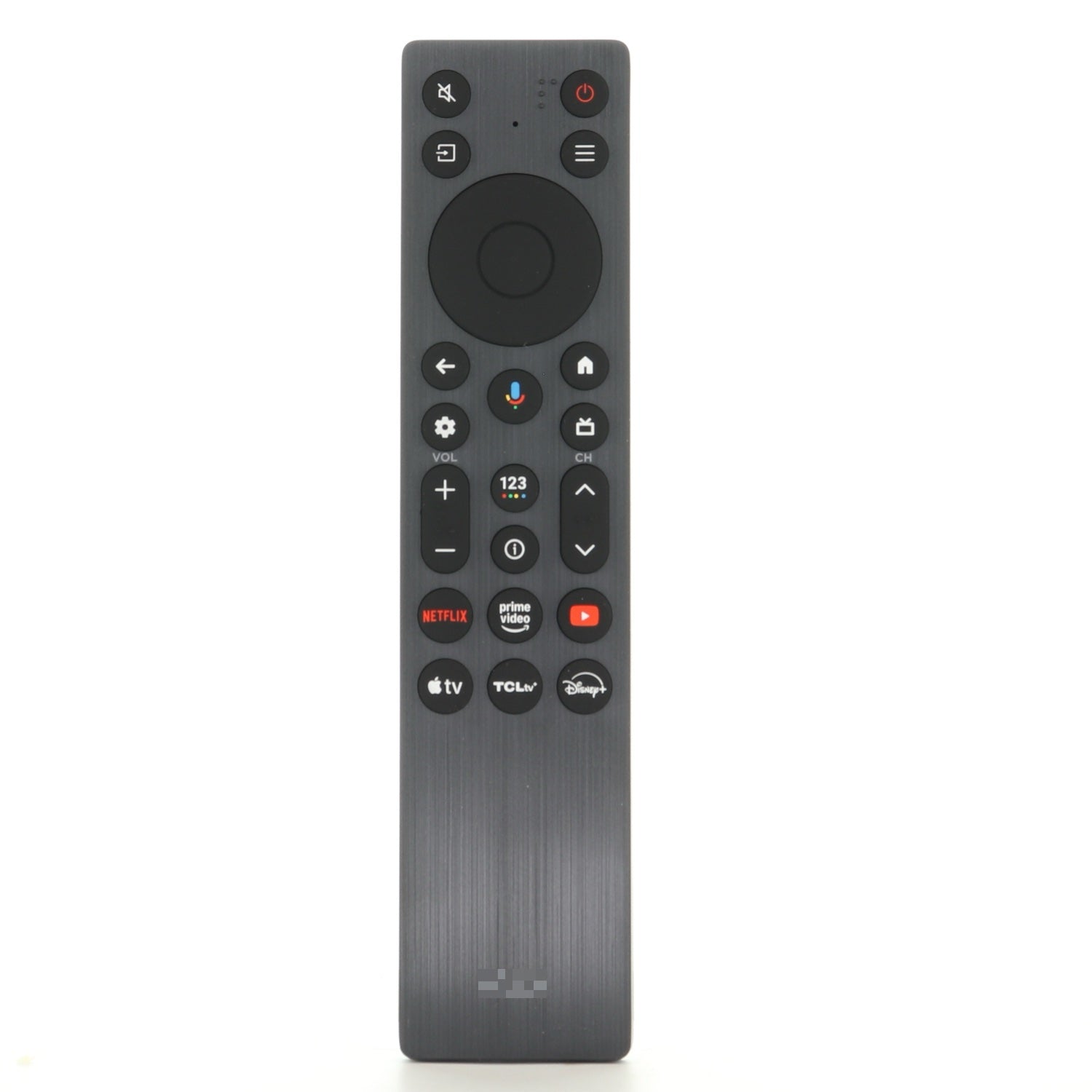
Where is the pause button on this remote?
This remote does not have a separate, dedicated pause button. While a
video is playing, press the OK button in the center of the navigation
ring to pause, and press OK again to resume. In most apps (Netflix,
YouTube, etc.) pressing OK during playback pauses the video.
How do I record and then view a program
Recording is not a function of the remote itself — the RC923A has no
record button — it is a feature of your TCL TV, and only some TCL
models support it. If your TV supports it, recording is done to a USB
drive plugged into the TV (this works for live digital antenna/cable
channels, not for streaming apps like Netflix or YouTube, which cannot
be recorded this way).
To record:
1. Plug a USB drive into the TV first (back up anything important on
it, as the TV may format it).
2. While watching the live channel you want to record, open the TV
menu and select PVR, then choose Record. Recording starts
automatically; use the on-screen options to set how long to record,
and stop it manually when you are done.
3. You can also schedule a recording from the program guide: open the
guide, select the program, and choose Schedule recording.
To watch a recording:
Exit PVR mode, then go to PVR > PVR list (or TV > Media > PVR on some
models), select the recording, and press OK to play it.
If you do not see a PVR option in your TV menu or guide, your TCL
model does not support recording, and the TV itself cannot record
programs — a separate DVR device would be needed for that.
Which model has backlight keys. The above portion says FMB2 does NOT have backbiting. The anwser on another question says the FMB2 is the one with back light. Which one is which?
Hi there!
The FMB2 does NOT have backlighting while the FMB1 does!
Is this remote supposed to be backlit? I recently got one from this site but the backlight isn’t functioning.
Hi there! Great question!
The TCL RC923A / FMB1 Google TV Remote Control does not have backlit keys. However, one of the compatible substitutes listed on our website—the TCL RC923 FMB2 Google TV Remote Control—does feature motion-activated backlighting, making it easier to use in low-light settings.