Use this bar to show information about your cookie policy.
Roll over image to zoom inClick on image to zoom
/
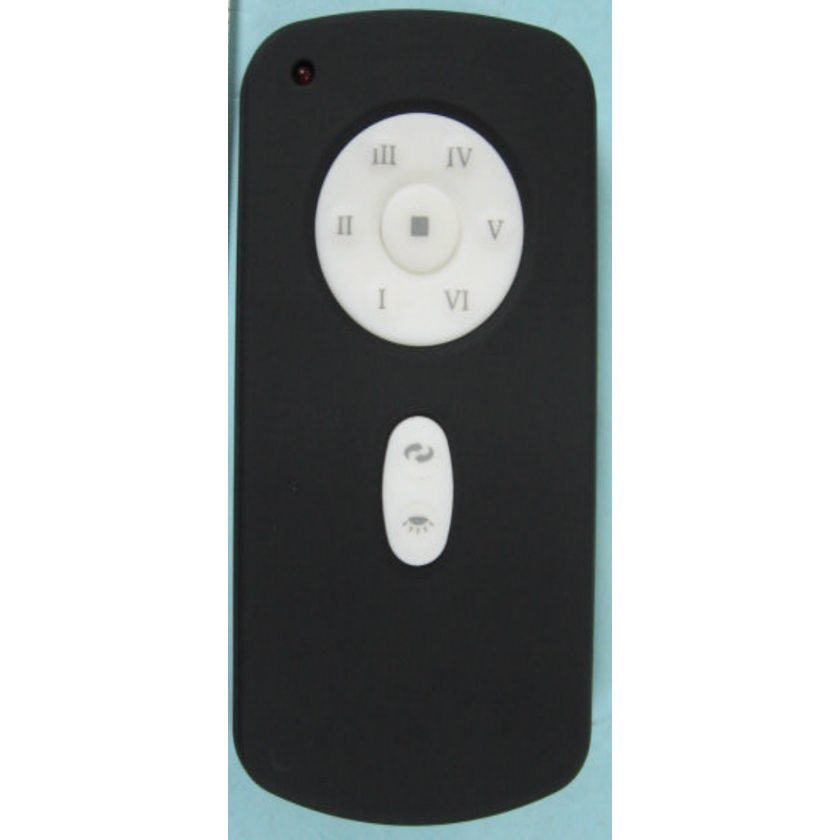
Description
Button functions I, II, III, IV, V, and VI buttons: These six buttons are used to set the fan speed as follows: I = minimum speed, II = low speed, III = medium-low speed, IV = medium speed, V = medium-high speed VI = high-speed B. button: This button turns the fan off. C. Reverse button: This button is to control fan direction. D. Light button This button is to control light. Switch the "D," and "ON" dip switches on the back of the transmitter to decide whether the light is in "ON/OFF" or "Dimmable" condition. E. SET code setting button:
Follow the below steps to use the SET button: a) With the fan's power off, arrange code switches to desired code setting. b ) After installing the unit and restoring power to the fan, press and hold the "SET" button for 1 - 5 seconds. You must press the "SET" button within 60 seconds of restoring power to the fan. c) The fan will start to run and begin the control setting process. The fan will run in both directions for approximately 5 minutes. d) When the fan stops after approximately 5 minutes, the control and speed setting process is complete, and the fan is ready for use. F. "D" and "ON" dip switch: The "ON" selection is the dimmable light selection and is to be used with all bulbs except for CFL bulbs. The "D" selection is the light on only (no dimming function) and is to be used with CFL bulbs as CFL bulbs cannot be adequately dimmed.
The receiver provides the following protective function: 1. Lock position: The DC motor has built-in safety against obstruction during operation. If there is an obstruction, the motor will stop, and the power will automatically go off in 30 seconds. Remove the obstacle and reset. 2. Over 80W protection: When the receiver detects motor power consumption greater than 80W, the receiver power will be stopped, and the operation will immediately discontinue. Wait for 5 seconds, and then turn the receiver power back on. Originally supplied with models: TR29
Specifications
Product help/documentation (if applicable):
Features:
Works with the ceiling fans shown in the compatibility list.
Set fan speed and lights from your seat for instant comfort.
Fits model code RH787T as listed.
Smooth toggles for speed and lighting make rooms feel just right.
the remote in the description and the website is not what i received
the remote in the description and the website is NOT the remote i received. it is not worth it to me to pay for shipping back and to have someone take it to some place to ship it back. what i ordered was a replacement remote for a Samsung UN50JU7500 Curved 50-Inch 4K Ultra HD 2015 model. what i received is for a much newer model and will not work with my tv. (I tried it)
You ordered the Anderic replacement RR1220E
Are you saying you did not receive the Anderic substitute?
Please email us if you received an incorrect item and we will be happy to assist
Thank you